


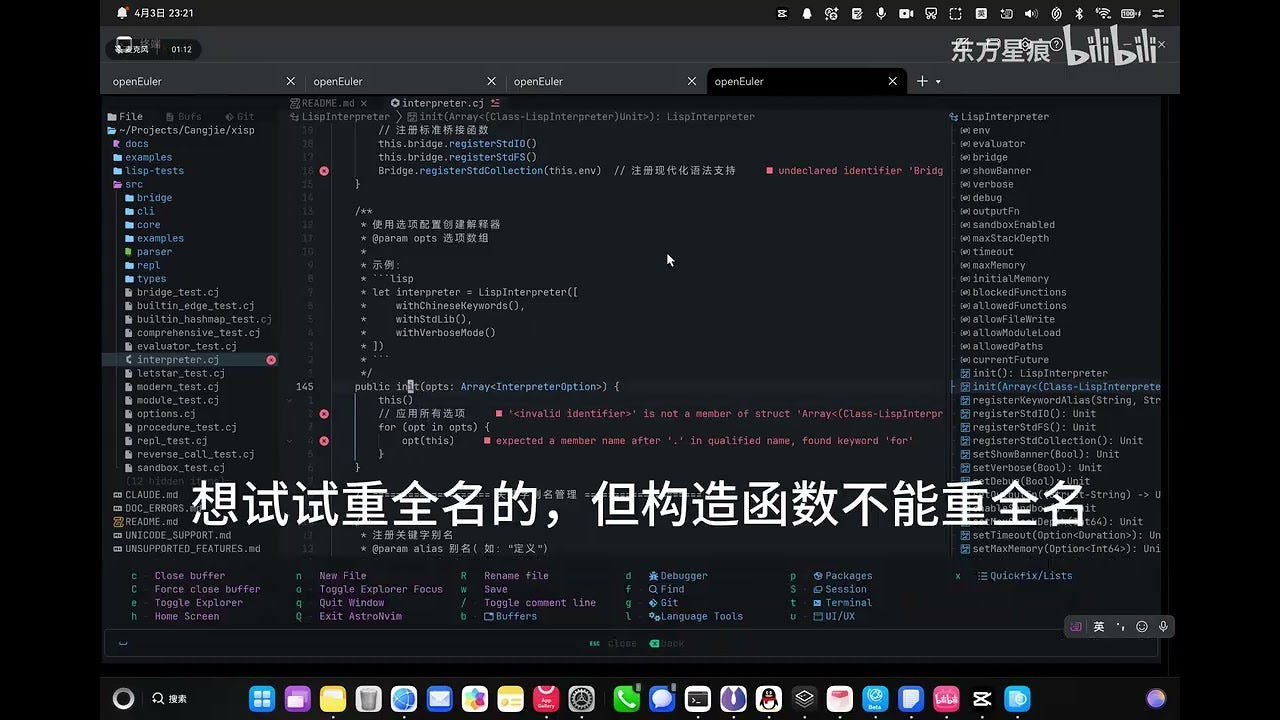
This document describes how to configure the Neovim (AstroNvim) development environment on the openEuler (aarch64) system for Cangjie language development.
Table of contents
System requirements:
操作系统:openEuler 2403 SP1 (aarch64)
GCC version: 12.3.1 or higher
Neovim version: 0.9.0 or higher
Install the Cangjie SDK
Download Cangjie SDK (aarch64 version) from official channels
Extract to the directory
~/.config/cjvs/store/
Example of a directory structure:
~/.config/cjvs/
└── store/
    └── 1.1.0-beta.25/
        ├── envsetup.sh
        ├── lib/
        ├── runtime/
        └── ...
安装 Cangjie STDX
STDX is Cangjie’s standard extension library and needs to be installed separately:
从发布页面下载:https://gitcode.com/Cangjie/cangjie_stdx/releases/v1.1.0-beta.24.1
Select Version
linux_aarch64_cjnativeExtract to the directory
~/.config/cjvs/stdx/
Example of a directory structure:
~/.config/cjvs/
└── stdx/
    └── 1.1.0-beta.24/
        └── linux_aarch64_cjnative/
            └── static/
                └── stdx/
                    ├── stdx.cjo
                    └── ...
Environment variable configuration
Edit to add the following configuration:~/.zshrc
# 仓颉 SDK 环境配置
source $HOME/.config/cjvs/store/1.1.0-beta.25/envsetup.sh

# STDX 路径配置
export CANGJIE_STDX_PATH=”$HOME/.config/cjvs/stdx/1.1.0-beta.24/linux_aarch64_cjnative/static/stdx”
After configuration, execute:
source ~/.zshrcNote:
envsetup.sh: Sets the environment variables required by the Cangjie compilerCANGJIE_STDX_PATH: Specifies the path to the STDX library
Create a gmotic link to the GCC runtime library
Since the Cangjie linker script searches the directory by default, you need to create a symlink:/lib64
sudo ln -sf /usr/lib/gcc/aarch64-openEuler-linux/12/crtbeginS.o /lib64/crtbeginS.o
sudo ln -sf /usr/lib/gcc/aarch64-openEuler-linux/12/crtendS.o /lib64/crtendS.o
sudo ln -sf /usr/lib/gcc/aarch64-openEuler-linux/12/crtbegin.o /lib64/crtbegin.o
sudo ln -sf /usr/lib/gcc/aarch64-openEuler-linux/12/crtend.o /lib64/crtend.oNote: Addresses an issue where runtime libraries such as cannot be found when linkingcrtbeginS.o
Neovim Configuration
1. Install AstroNvim
git clone --depth 1 https://github.com/AstroNvim/AstroNvim ~/.config/nvim2. Configure the Cangjie LSP plug-in
Create File :~/.config/nvim/lua/plugins/cangjie-lsp.lua
return {
  “https://gitcode.com/ystyle/cangjie-nvim”,
  dependencies = { “neovim/nvim-lspconfig” },
  opts = { auto_install = true },
  config = function(plugin)
    require(”cangjie-nvim”).setup(plugin.opts)

    vim.api.nvim_create_autocmd(”LspAttach”, {
      callback = function(args)
        if vim.bo[args.buf].filetype ~= “Cangjie” then return end

        local function map(mode, lhs, rhs, desc)
          vim.keymap.set(mode, lhs, rhs, { buffer = args.buf, desc = desc })
        end

        map(”n”, “<leader>li”, “<cmd>LspInfo<cr>”, “LSP Info”)
        map(”n”, “K”, vim.lsp.buf.hover, “Hover Document”)
        map(”n”, “<leader>lf”, function() vim.lsp.buf.format { async = true } end, “Format Document”)
        map(”n”, “gl”, vim.diagnostic.open_float, “Line Diagnostics”)
        map(”n”, “<leader>ld”, vim.diagnostic.open_float, “Line Diagnostics”)
        map(”n”, “<leader>lD”, vim.diagnostic.setqflist, “All Diagnostics”)
        map(”n”, “gra”, vim.lsp.buf.code_action, “Code Actions”)
        map(”n”, “<leader>la”, vim.lsp.buf.code_action, “Code Actions”)
        map(”n”, “<leader>lh”, vim.lsp.buf.signature_help, “Signature Help”)
        map(”n”, “grn”, vim.lsp.buf.rename, “Rename”)
        map(”n”, “<leader>lr”, vim.lsp.buf.rename, “Rename”)
        map(”n”, “<leader>ls”, vim.lsp.buf.document_symbol, “Document Symbols”)
        map(”n”, “<leader>lG”, vim.lsp.buf.workspace_symbol, “Workspace Symbols”)
        map(”n”, “]d”, vim.diagnostic.goto_next, “Diagnostic Next”)
        map(”n”, “[d”, vim.diagnostic.goto_prev, “Diagnostics Previous”)
        map(”n”, “]e”, function() vim.diagnostic.goto_next { severity = vim.diagnostic.severity.ERROR } end, “Error Next”)
        map(”n”, “[e”, function() vim.diagnostic.goto_prev { severity = vim.diagnostic.severity.ERROR } end, “Error Previous”)
        map(”n”, “]w”, function() vim.diagnostic.goto_next { severity = vim.diagnostic.severity.WARN } end, “Warning Next”)
        map(”n”, “[w”, function() vim.diagnostic.goto_prev { severity = vim.diagnostic.severity.WARN } end, “Warning Previous”)
        map(”n”, “gD”, vim.lsp.buf.declaration, “Declaration”)
        map(”n”, “gy”, vim.lsp.buf.type_definition, “Type Definition”)
        map(”n”, “gd”, vim.lsp.buf.definition, “Definition”)
        map(”n”, “gri”, vim.lsp.buf.implementation, “Implementation”)
        map(”n”, “grr”, vim.lsp.buf.references, “References”)
      end,
    })
  end,
}
3. Launch Neovim and install the plugin
nvimAstroNvim automatically detects and installs plugins. When you first open the file, the plugin automatically downloads the LSP wrapper binary.cangjie-nvim.cj
LSP Wrapper Address:
Automatic download location:
~/.local/share/nvim/data/cangjie-nvim/bin/
FAQs
1. 链接错误:cannot find crtbeginS.o
Error message:
/usr/bin/ld: cannot find crtbeginS.o: No such file or directorySolution:
Create a symbolic link to the GCC runtime library:
sudo ln -sf /usr/lib/gcc/aarch64-openEuler-linux/12/crtbeginS.o /lib64/crtbeginS.o
sudo ln -sf /usr/lib/gcc/aarch64-openEuler-linux/12/crtendS.o /lib64/crtendS.o
sudo ln -sf /usr/lib/gcc/aarch64-openEuler-linux/12/crtbegin.o /lib64/crtbegin.o
sudo ln -sf /usr/lib/gcc/aarch64-openEuler-linux/12/crtend.o /lib64/crtend.o
2. LSP does not work
Check Steps:
Verify that the Cangjie SDK environment variables are loaded:
echo $CANGJIE_HOMEConfirm that the LSP wrapper is downloaded:
ls ~/.local/share/nvim/data/cangjie-nvim/bin/To install the LSP wrapper manually:
:lua require(”cangjie-nvim”).install()3. STDX not found
Error message:
error: cannot find stdx moduleSolution:
Confirm that the environment variable points to the correct directory:CANGJIE_STDX_PATH
ls $CANGJIE_STDX_PATH
# 应该能看到 stdx.cjo 文件
4. Quick event context error
Error message:
E5560: nvim_create_namespace must not be called in a fast event contextSolution:
This issue has been fixed in the plugin, make sure you are using the latest version.cangjie-nvim
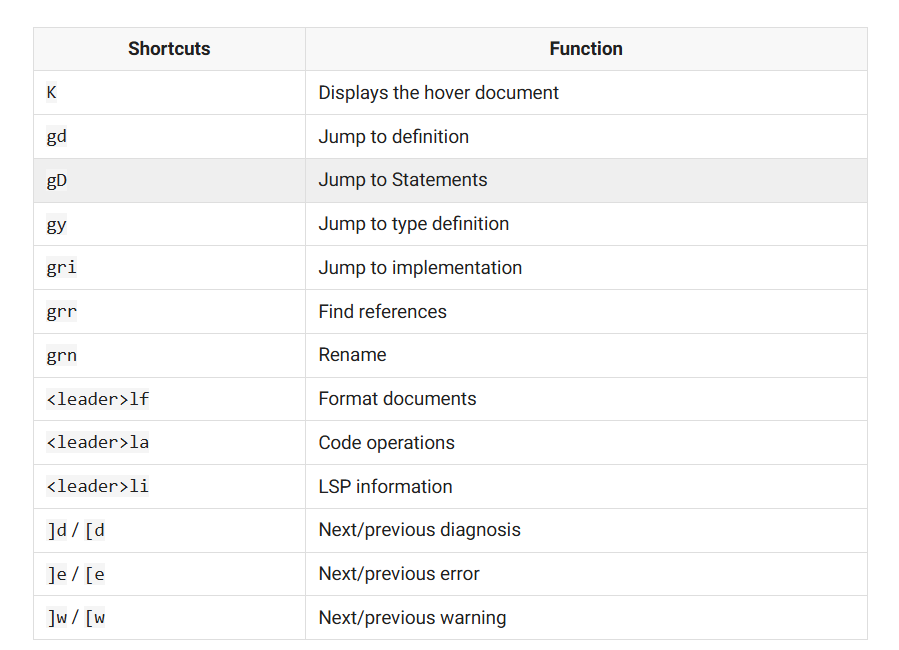
Keybit mapping
Source: 欢迎回来╮(╯▽╰)╭