


title=”HarmonyOS PC openEuler is commonly used to develop software” frameborder=”0” allow=”accelerometer; autoplay; clipboard-write; encrypted-media; gyroscope; picture-in-picture; web-share” referrerpolicy=”strict-origin-when-cross-origin” allowfullscreen></iframe>
Background of the problem
glibc version conflict
In the openEuler container of the HarmonyOS PC Convergence Development Engine, an error is encountered when trying to install the nvim-treesitter plugin:
[nvim-treesitter/install/c] error: Error during “tree-sitter build”:
tree-sitter: /usr/lib64/libc.so.6: version `GLIBC_2.39’ not found (required by tree-sitter)
Version check
ldd --version
# 输出:ldd (GNU libc) 2.38

cat /etc/os-release
# NAME=”openEuler”
# VERSION=”24.03 (LTS-SP1)”
glibc for openEuler 24.03 SP1 is 2.38, while the precompiled tree-sitter CLI downloaded by nvim-treesitter requires glibc 2.39.
Root causes
Container environments share virtual machine kernels and cannot be upgraded to glibc. The solution is to compile all components from source, using the glibc version of the current system.
Solution overview
1. 安装编译依赖
2. 安装Rust工具链(编译tree-sitter CLI需要)
3. 从源码编译tree-sitter CLI
4. 从源码编译Neovim
5. 配置AstroNvim
1. Install compilation dependencies
Basic tools
# 安装cmake和ninja
sudo dnf install -y cmake ninja-build

# 验证安装
cmake --version
ninja --version
Other dependencies
# gcc、make等已预装
gcc --version
make --version
2. Install the Rust toolchain
The tree-sitter CLI is written in Rust and needs to be installed first:
# 设置代理(可选)
export https_proxy=http://192.168.3.6:1080

# 安装Rust
curl --proto ‘=https’ -sSf https://sh.rustup.rs | sh -s -- -y

# 加载环境
source ~/.cargo/env

# 验证
cargo --version
rustc --version
3. Compile the tree-sitter CLI
Get the source code
export https_proxy=http://192.168.3.6:1080

# 克隆tree-sitter CLI(使用稳定版本v0.24.1)
git clone --depth 1 --branch v0.24.1 \
    https://github.com/tree-sitter/tree-sitter.git \
    ~/tree-sitter-cli
Compilation
cd ~/tree-sitter-cli
cargo build --release
The compilation process takes about 1-2 minutes.
Installation
# 系统安装
sudo cp ~/tree-sitter-cli/target/release/tree-sitter /usr/local/bin/

# 或替换mason的预编译版本
cp ~/tree-sitter-cli/target/release/tree-sitter \
    ~/.local/share/nvim/mason/packages/tree-sitter-cli/tree-sitter-linux-arm64

# 验证
tree-sitter --version
# 输出:tree-sitter 0.24.1
4. Compiling Neovim
Get the source code
export https_proxy=http://192.168.3.6:1080

# 查看最新版本
git ls-remote --tags https://github.com/neovim/neovim.git | \
    grep -v ‘\^{}’ | grep ‘v0\.1[0-2]’ | tail -5

# 克隆最新稳定版v0.12.0
git clone --depth 1 --branch v0.12.0 \
    https://github.com/neovim/neovim.git \
    ~/neovim
Compilation
cd ~/neovim
make CMAKE_BUILD_TYPE=Release
The compilation process takes about 3-5 minutes and automatically downloads and compiles all dependencies.
Installation
sudo make install

# 验证
nvim --version
# 输出:
# NVIM v0.12.0
# Build type: Release
# LuaJIT 2.1.1774638290
Compile output location
ls ~/neovim/build/bin/nvim
# -rwxr-xr-x 1 user user 10346568 ... nvim
5. Configure AstroNvim
AstroNvim is a pre-configured Neovim distribution that provides a complete IDE experience.
Back up existing configurations
# 备份旧配置
mv ~/.config/nvim ~/.config/nvim.bak
mv ~/.local/share/nvim ~/.local/share/nvim.bak
mv ~/.local/state/nvim ~/.local/state/nvim.bak
Install AstroNvim
# 克隆AstroNvim配置
git clone --depth 1 https://github.com/AstroNvim/AstroNvim \
    ~/.config/nvim

# 复制默认用户配置模板
cp ~/.config/nvim/lua/user_template.lua ~/.config/nvim/lua/user.lua
First launch
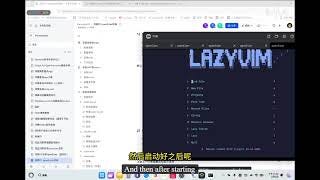
nvimThe first launch automatically installs all plugins and the tree-sitter parser. Since we have compiled the tree-sitter CLI, the treesitter installation does not give glibc errors.
Custom configuration
Edit :~/.config/nvim/lua/user.lua
return {
  -- 自定义颜色方案
  colorscheme = “catppuccin-mocha”,

  -- 自定义选项
  options = {
    opt = {
      relativenumber = true, -- 相对行号
    },
  },

  -- 自定义插件
  plugins = {
    “rebelot/kanagawa.nvim”,
    -- 添加更多插件...
  },

  -- LSP配置
  lsp = {
    formatting = {
      format_on_save = true,
    },
    servers = {
      -- 添加LSP服务器...
    },
  },
}
Install LSPs and tools
Running in Neovim:
:LspInstall python
:LspInstall lua_ls
:TSInstall python
:TSInstall lua
:MasonInstall prettier
6. Verify the tree-sitter work
Install the parser
:TSInstallInfoReview the available parsers and select the desired installation:
:TSInstall vimdoc
:TSInstall lua
:TSInstall python
:TSInstall javascript
:TSInstall html
:TSInstall css
:TSInstall json
:TSInstall markdown
Check the status
:TSInstallInfoAll parsers should appear as .✓ installed
7. Summary
Compiled checklist
Components version state cmake 3.27.9
✓ Installedninja1.11.1
✓ InstalledRust1.94.1
✓ Installedtree-sitter CLI0.24.1
✓ Compiled Neovim0.12.0
✓ Compiled Astro Nvim latest
✓ Configured
Key points
glibc compatible: Compiling from source ensures that the current glibc is used
Rust dependencies: tree-sitter CLI requires Rust compilation
Full flow: Rely on → Rust → tree-sitter → Neovim → AstroNvim
Performance
The compiled Neovim runs smoothly in the openEuler container:
Startup speed: < 100ms
LSP Response: Fast
Treesitter Highlight: Normal
Plugin ecosystem: Full support
Guide to avoiding pits
Don’t use precompiled tree-sitter: mason downloaded precompiled versions of glibc are not compatible
Remember to replace Mason’s tree-sitter: otherwise nvim-treesitter will still use the precompiled version
Use stable version: avoid instability in the main branch
8. Clean up the construction files
After the compilation is complete, you can clean up the source code:
# 可选:保留源码用于后续升级
# 或删除以节省空间
rm -rf ~/tree-sitter-cli
rm -rf ~/neovim
It is recommended to keep the source code directory for future version upgrades.
9. Follow-up upgrades
Upgrading Neovim:
cd ~/neovim
git fetch --tags
git checkout v0.13.0  # 假设新版本
make CMAKE_BUILD_TYPE=Release
sudo make install
Upgrade tree-sitter:
cd ~/tree-sitter-cli
git fetch --tags
git checkout v0.25.0  # 假设新版本
cargo build --release
sudo cp target/release/tree-sitter /usr/local/bin/References:
Neovim official website:
https://neovim.io
tree-sitter project:
https://tree-sitter.github.io
AstroNvim documentation:
https://astronvim.com
AstroNvim repository: https://github.com/AstroNvim/AstroNvim
Source: 欢迎回来╮(╯▽╰)╭