


A few months ago, I bought a Huawei tablet and have been hoping to take the opportunity to develop HarmonyOS, but since DevEco does not support Linux, I started considering whether a port might be possible.
Preparation
Get the Windows version of DevEco Studio
Here, we download the Windows version installation package from Huawei’s official website (at the time of writing, the downloadable version is DevEco Studio 6.0.2 Release) and install it via wine. If all installation configurations remain by default, the DevEco program main body should be located below. We enter this directory.~/.wine/drive_c/Program Files/Huawei/DevEco Studio
Get IDEA
Since the current DevEco Studio is based on modifications of IDEA, we need a Linux version of IDEA as a reference. The version I downloaded is 2025.3.2.
After extracting and organizing the directory, our directory format is as follows:
.
├── DevEco Studio
│   ├── bin
│   ├── ......
│   └── tools
└── idea-IU-253.30387.90
	├── bin
	├── ......
	└── plugins
bash
Transplant environment
Transplanting JBR
JBR (Jetbrains Runtime) is a JDK update created by JetBrains, and it was included when we downloaded IDEA. Simply copy and replace the jbr directory in DevEco Studio.
Of course, the JBR versions used by IDEA and DevEco are not necessarily the same. If you want the JBR versions to match exactly, you can print the DevEco JBR version using wine and download it from Github.
Port Node
Huawei’s build tools are either written in Nodejs or Python. Checking tools/node, I found that NodeJS version is v18.20.1 LTS, so I downloaded that version from the official website, extracted it, and replaced the original directory. (To keep the Windows version directory structure consistent, I softlinked all files in the node/bin subdirectory to the node directory.)
At this point, there should be a node folder in the directory.tools
Replace libs
Go to the directory, copy the three directories from the IDEA sample, and replace the directories in DevEcolibnative, pty4j, jna
Replace the OpenHarmony SDK
Here, you can replace it with the downloaded OpenHarmony SDK. (As for how to download it, you can directly use the download tool provided by DevEco. You can skip this step and complete the other steps. After that, you should be able to open it on Linux and download the SDK.)sdk/default/openharmony
Reverse official launcher
Since Huawei most likely directly copied the official launcher, here I directly used IDA to reverse bin/idea. The most useful function should be. The conclusions drawn with the help of GPT are as follows:xplat_launcheer::main_lib
The launcher is written in Rust
, the world’s best languageWhen the launcher loads, it regressively reads files from the upper level of the current directory, with a maximum depth of 5
product-info.jsonThe launcher loads the properties file, specifically the one that loads is
Therefore, by writing and , we can complete the final porting work.product-info.jsondevecostudio.vmoption
Write the relevant configuration files
I won’t elaborate on this part; here are some VMOption & product-info & idea properties you can copy from:
// product-info.json
{
"name": "DevEco Studio",
"version": "6.0.2.640",
"versionSuffix": "",
"buildNumber": "243.24978.46.36.602640",
"productCode": "DS",
"envVarBaseName": "DEVECOSTUDIO",
"dataDirectoryName": "DevEcoStudio6.0",
"svgIconPath": "bin/devecostudio.svg",
"productVendor": "Huawei",
"launch": [
{
"os": "Linux",
"arch": "amd64",
"launcherPath": "bin/devecostudio",
"javaExecutablePath": "jbr/bin/java",
"vmOptionsFilePath": "bin/devecostudio64-lin.vmoptions",
"startupWmClass": "deveco-studio",
"bootClassPathJarNames": [
"platform-loader.jar",
"util-8.jar",
"util.jar",
"util_rt.jar",
"opentelemetry.jar",
"app.jar",
"stats.jar",
"jps-model.jar",
"external-system-rt.jar",
"rd.jar",
"bouncy-castle.jar",
"protobuf.jar",
"forms_rt.jar",
"lib.jar",
"externalProcess-rt.jar",
"groovy.jar",
"annotations.jar",
"hwlib.jar",
"idea_rt.jar",
"kotlinx-coroutines-slf4j-1.8.0-intellij.jar",
"nio-fs.jar",
"trove.jar"
],
"additionalJvmArguments": [
"-Djava.system.class.loader=com.intellij.util.lang.PathClassLoader",
"-Didea.vendor.name=Huawei",
"-Didea.paths.selector=DevEcoStudio6.0",
"-Djna.boot.library.path=$IDE_HOME/lib/jna/amd64",
"-Dpty4j.preferred.native.folder=$IDE_HOME/lib/pty4j",
"-Djna.nosys=true",
"-Djna.noclasspath=true",
"-Dintellij.platform.runtime.repository.path=$IDE_HOME/modules/module-descriptors.jar",
"-Didea.platform.prefix=DevEcoStudio",
"-Dsplash=true",
"-Daether.connector.resumeDownloads=false",
"-Dcompose.swing.render.on.graphics=true",
"--add-opens=java.base/java.io=ALL-UNNAMED",
"--add-opens=java.base/java.lang=ALL-UNNAMED",
"--add-opens=java.base/java.lang.ref=ALL-UNNAMED",
"--add-opens=java.base/java.lang.reflect=ALL-UNNAMED",
"--add-opens=java.base/java.net=ALL-UNNAMED",
"--add-opens=java.base/java.nio=ALL-UNNAMED",
"--add-opens=java.base/java.nio.charset=ALL-UNNAMED",
"--add-opens=java.base/java.text=ALL-UNNAMED",
"--add-opens=java.base/java.time=ALL-UNNAMED",
"--add-opens=java.base/java.util=ALL-UNNAMED",
"--add-opens=java.base/java.util.concurrent=ALL-UNNAMED",
"--add-opens=java.base/java.util.concurrent.atomic=ALL-UNNAMED",
"--add-opens=java.base/java.util.concurrent.locks=ALL-UNNAMED",
"--add-opens=java.base/jdk.internal.vm=ALL-UNNAMED",
"--add-opens=java.base/sun.net.dns=ALL-UNNAMED",
"--add-opens=java.base/sun.nio.ch=ALL-UNNAMED",
"--add-opens=java.base/sun.nio.fs=ALL-UNNAMED",
"--add-opens=java.base/sun.security.ssl=ALL-UNNAMED",
"--add-opens=java.base/sun.security.util=ALL-UNNAMED",
"--add-opens=java.desktop/com.sun.java.swing=ALL-UNNAMED",
"--add-opens=java.desktop/com.sun.java.swing.plaf.gtk=ALL-UNNAMED",
"--add-opens=java.desktop/java.awt=ALL-UNNAMED",
"--add-opens=java.desktop/java.awt.dnd.peer=ALL-UNNAMED",
"--add-opens=java.desktop/java.awt.event=ALL-UNNAMED",
"--add-opens=java.desktop/java.awt.font=ALL-UNNAMED",
"--add-opens=java.desktop/java.awt.image=ALL-UNNAMED",
"--add-opens=java.desktop/java.awt.peer=ALL-UNNAMED",
"--add-opens=java.desktop/javax.swing=ALL-UNNAMED",
"--add-opens=java.desktop/javax.swing.plaf.basic=ALL-UNNAMED",
"--add-opens=java.desktop/javax.swing.text=ALL-UNNAMED",
"--add-opens=java.desktop/javax.swing.text.html=ALL-UNNAMED",
"--add-opens=java.desktop/javax.swing.text.html.parser=ALL-UNNAMED",
"--add-opens=java.desktop/sun.awt=ALL-UNNAMED",
"--add-opens=java.desktop/sun.awt.X11=ALL-UNNAMED",
"--add-opens=java.desktop/sun.awt.datatransfer=ALL-UNNAMED",
"--add-opens=java.desktop/sun.awt.image=ALL-UNNAMED",
"--add-opens=java.desktop/sun.font=ALL-UNNAMED",
"--add-opens=java.desktop/sun.java2d=ALL-UNNAMED",
"--add-opens=java.desktop/sun.swing=ALL-UNNAMED",
"--add-opens=java.management/sun.management=ALL-UNNAMED",
"--add-opens=jdk.attach/sun.tools.attach=ALL-UNNAMED",
"--add-opens=jdk.compiler/com.sun.tools.javac.api=ALL-UNNAMED",
"--add-opens=jdk.internal.jvmstat/sun.jvmstat.monitor=ALL-UNNAMED",
"--add-opens=jdk.jdi/com.sun.tools.jdi=ALL-UNNAMED"
],
"mainClass": "com.intellij.idea.Main"
}
],
"bundledPlugins": [],
"modules": [],
"fileExtensions": [],
"layout": []
}
json
# devecostudio64-lin.vmoptions
-Xms256m
-Xmx2048m
-XX:ReservedCodeCacheSize=512m
-XX:CICompilerCount=2
-XX:+HeapDumpOnOutOfMemoryError
-XX:-OmitStackTraceInFastThrow
-XX:+IgnoreUnrecognizedVMOptions
-XX:+UnlockDiagnosticVMOptions
-XX:TieredOldPercentage=100000
-ea
-Dfile.encoding=UTF-8
-Dsun.java2d.metal=true
-Dawt.lock.fair=true
-Dsun.io.useCanonCaches=false
-Djdk.nio.maxCachedBufferSize=2097152
-Djava.util.zip.use.nio.for.zip.file.access=true
-Djava.nio.file.spi.DefaultFileSystemProvider=com.intellij.platform.core.nio.fs.MultiRoutingFileSystemProvider
-Djdk.attach.allowAttachSelf=true
-Dsun.tools.attach.tmp.only=true
-Djdk.http.auth.tunneling.disabledSchemes=""
-Djdk.module.illegalAccess.silent=true
-Djbr.catch.SIGABRT=true
-Dkotlinx.coroutines.debug=off
-Djava.security.manager=com.intellij.platform.core.nio.fs.CoreBootstrapSecurityManager
bash
# idea.properties

# ---------------------------------------------------------------------
# DevEco Studio - Linux
# Based on IntelliJ Platform 243.x
# ---------------------------------------------------------------------

# Use ${idea.home.path} macro to specify location relative to IDE installation home.
# Use ${xxx} where xxx is any Java property (including defined in previous lines of this file)
# to refer to its value.

# ---------------------------------------------------------------------
# Paths (use defaults unless you really need to override)
# ---------------------------------------------------------------------
# idea.config.path=${user.home}/.DevEcoStudio/config
# idea.system.path=${user.home}/.DevEcoStudio/system
# idea.plugins.path=${idea.config.path}/plugins
# idea.log.path=${idea.system.path}/log

# ---------------------------------------------------------------------
# File size limits
# ---------------------------------------------------------------------
idea.max.intellisense.filesize=2500
idea.max.content.load.filesize=20000

# ---------------------------------------------------------------------
# Console & process behavior
# ---------------------------------------------------------------------
idea.cycle.buffer.size=4096
idea.no.launcher=false
idea.dynamic.classpath=false

# ---------------------------------------------------------------------
# UI / Window manager behavior
# ---------------------------------------------------------------------
idea.popup.weight=heavy

# ---------------------------------------------------------------------
# Graphics & rendering (Linux-safe)
# ---------------------------------------------------------------------
sun.java2d.d3d=false
sun.java2d.pmoffscreen=false
swing.bufferPerWindow=true
sun.java2d.uiScale.enabled=false
javax.swing.rebaseCssSizeMap=true

# ---------------------------------------------------------------------
# Accessibility & stability (JBR)
# ---------------------------------------------------------------------
javax.swing.JTree.excludeAccessibleChildrenFromClosedNodes=true
sun.awt.mac.a11y.tableAccessibleRowCountThreshold=1000
sun.lwawt.macosx.LWCToolkit.invokeAndWait.disposeOnEDTFree=true

# ---------------------------------------------------------------------
# Smooth scrolling (disabled by default, stable choice)
# ---------------------------------------------------------------------
# idea.true.smooth.scrolling=true

# ---------------------------------------------------------------------
# DevEco specific: plugin compatibility baseline
# IMPORTANT: keeps DevEco plugins from behaving like pure IDEA plugins
# ---------------------------------------------------------------------
idea.plugins.compatible.build=IC-243.24978.46

# ---------------------------------------------------------------------
# HarmonyOS / DevEco toolchain (keep even if commented)
# ---------------------------------------------------------------------
# ide.harmonyos.sdk.location=/path/hosdk/
# ide.ohpm.location=/path/ohpm
# ide.hvigor.location=/path/hvigor
# ide.node.location=/path/node
# ide.emulator.location=/path/emulator

# ---------------------------------------------------------------------
# ArkTS / Node related limits (optional)
# ---------------------------------------------------------------------
# arkts.server.max.intellisense.filesize=10240
# arkts.server.max.old.space.size=8192

# ---------------------------------------------------------------------
# Error handling
# ---------------------------------------------------------------------
idea.fatal.error.notification=disabled
properties
One fun fact worth noting here: if you enable IDEA’s recommended Scale by OS, Huawei’s strange plugin loading mechanism will mess everything up! So set it to false here, and we’ve completed the entire port.sun.java2d.uiScale=true
Handling signature issues
At this point, DevEco seems to be developing normally, but strange issues arise during signing:
2026-02-05 22:20:54,000 [ 490226]   WARN - #com.huawei.deveco.projectmgmt.hos.s
ignature.sign.utils.AutoGenerateKeyCSRUtil - No available JDK is found.
2026-02-05 22:21:00,716 [ 496942]   WARN - #com.huawei.deveco.projectmgmt.hos.s
ignature.sign.utils.AutoGenerateKeyCSRUtil - No available JDK is found.
plaintext
We use Recaf to reverse this component. (If you have friends working on Java reverse engineering, I sincerely recommend Recaf. So far, it’s the best Java decompilation and bytecode modification tool I’ve used—absolutely a legendary tool.) The component location is, and the related code is:plugins/harmony/lib/hos-project-mgmt-6.0.2.640.jar
String toolPath = homePath + TOOL_PATH;              // /jbr/bin
if (SystemInfo.isMac || SystemInfo.isLinux) {
    toolPath = homePath + MAC_TOOL_PATH;             // /jbr/Contents/Home/bin
}
java
In other words, Linux is directly grouped with Mac, component search is , and the actual path is.jbr/Contents/Home/bin/keytooljbr/bin/keytool
Therefore, we will “disguise the path,” and the specific method will not be elaborated here.
Porting “Simulator”
Since HarmonyOS’s emulator is not open source, we obviously cannot force compatibility with it, so here we use Oniro Emulator. Install and configure according to the requirements.
Effect
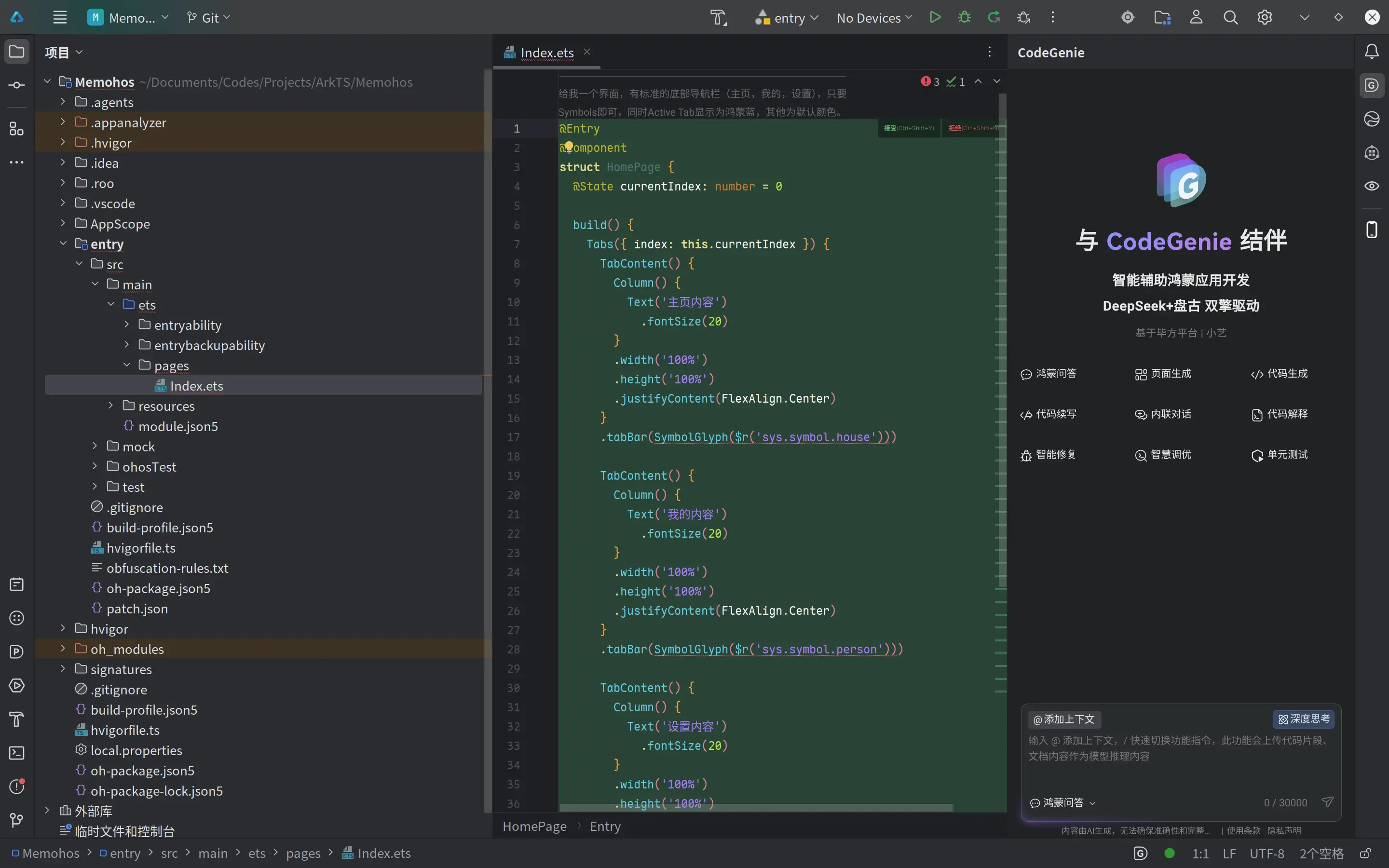
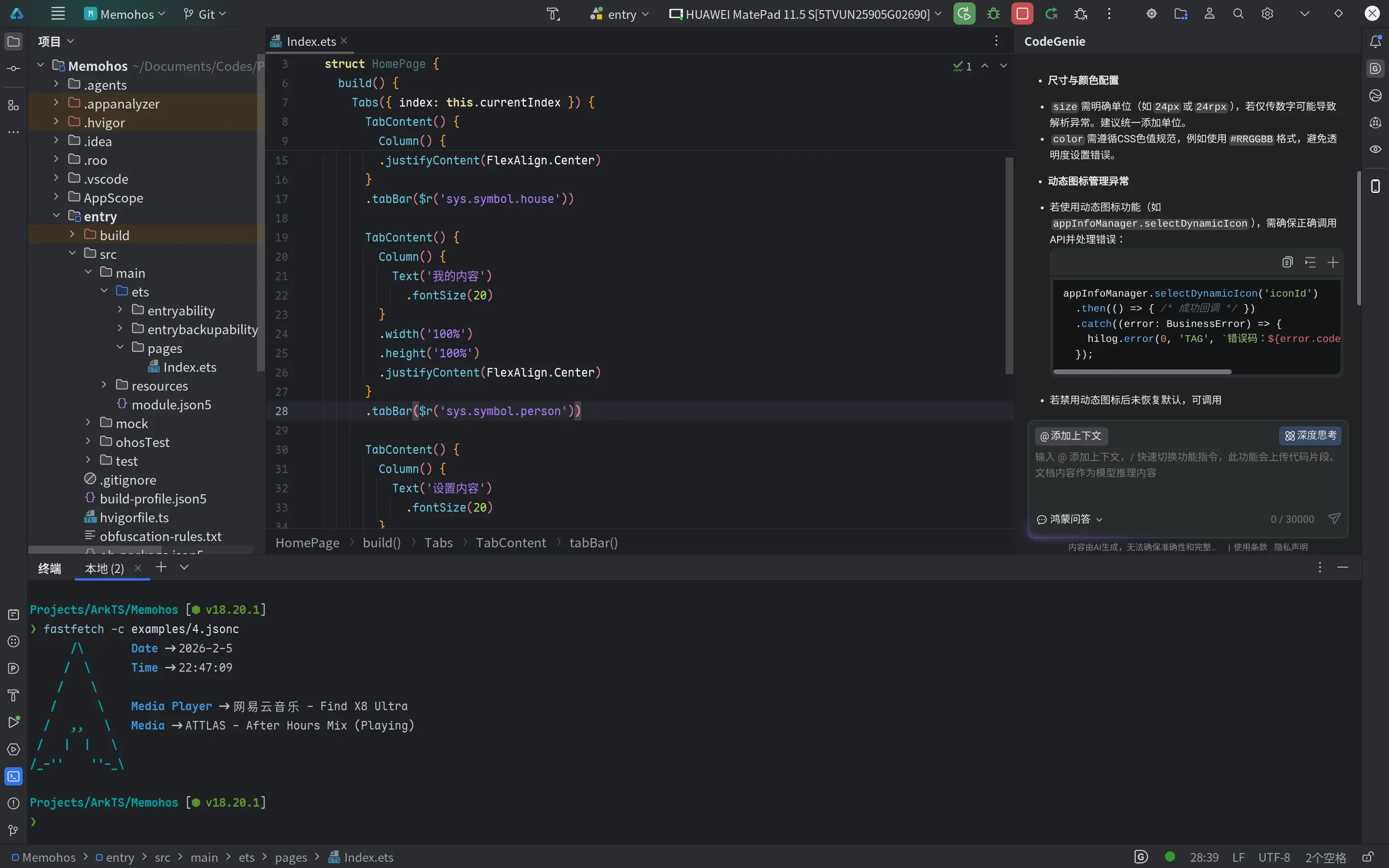
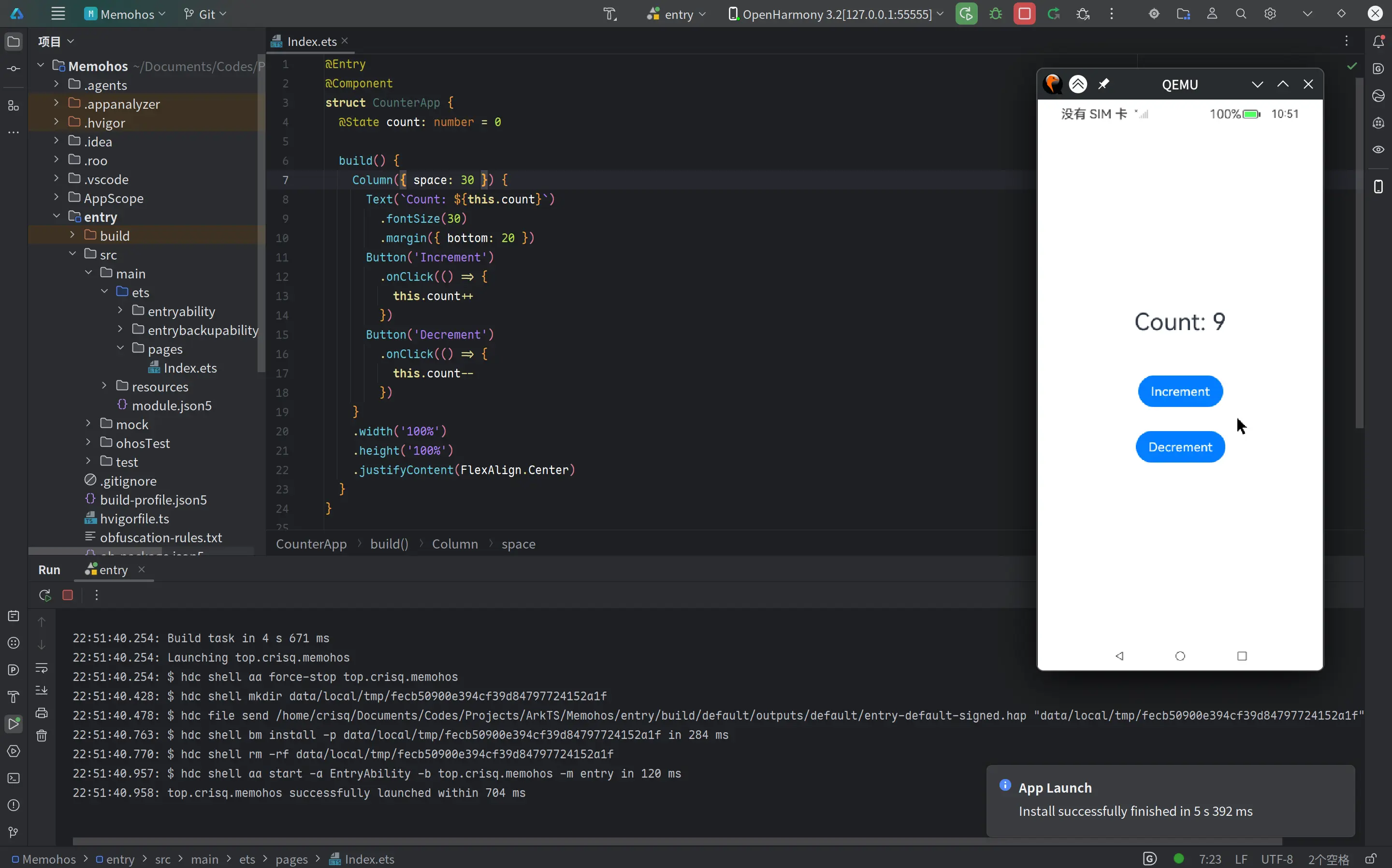
GitHub Link: alex3236/devecostudio-linux: Bring DevEco Studio to Linux
Credit: ChrisQ (China) - DevEco Studio Port Notes • Cris.Q